Smarter Teams, AI-Powered Booking & Connected Workspaces
Our biggest quarter yet. Team collaboration, workspace policies, usage insights, AI-powered booking through Slack and MCP, plus four new integrations for access control and room scheduling. Here’s everything we’ve shipped.

The quarter we built for teams
Imagine running a workspace program for thirty people scattered across a dozen cities. You want to give every one of them somewhere great to work, keep the spending sane, prove to finance that it's worth it, and somehow do all of that without becoming the person who polices everyone's calendar. For a long time, the tools for that job were a spreadsheet and a lot of good intentions.
This was the quarter we set out to replace that spreadsheet. Running a team's workspace program is really four jobs at once: getting people together, setting sensible guardrails, knowing whether any of it is working, and making the whole thing effortless. Then there's a fifth, quieter job underneath them all: connecting the software to the physical doors and rooms people actually walk through. Here's what we shipped for each, and how it fits together.
Team Collaboration
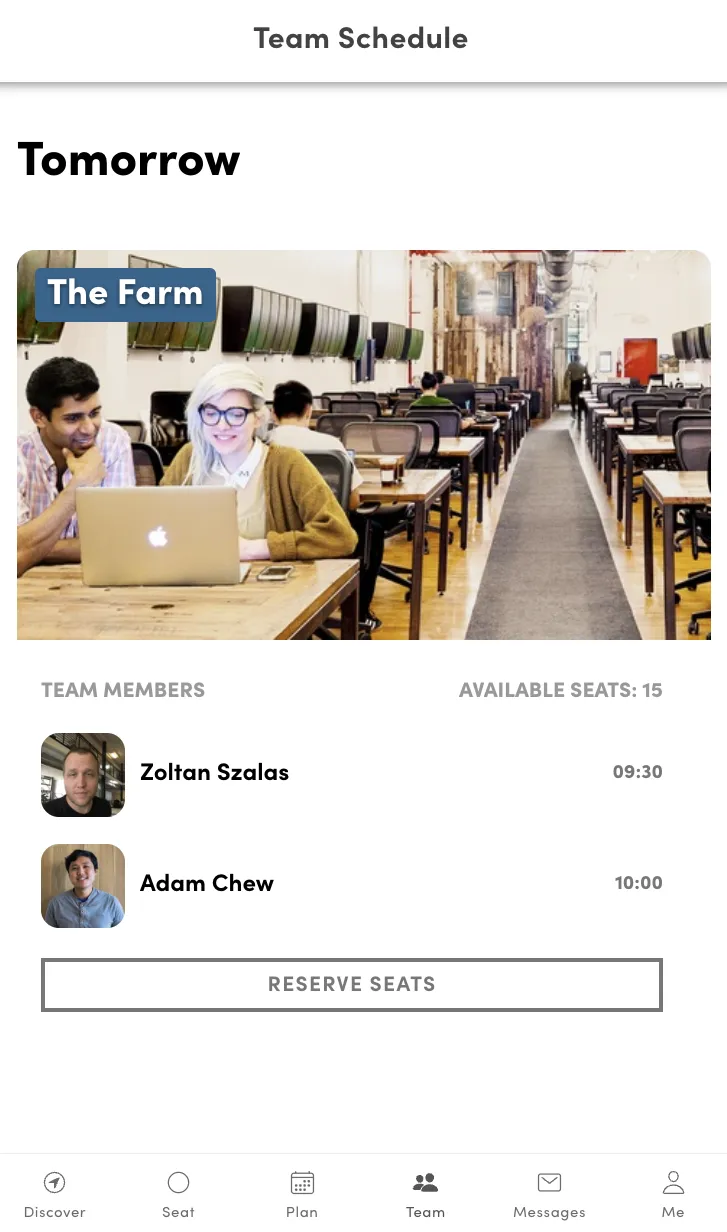
It starts with people simply wanting to be in the same room. You know the ritual: the "anyone going in Thursday?" message, the thread that splinters into three side conversations, the half-formed plan that quietly falls apart by Wednesday. The intent was always there. The coordination was the hard part. So we moved it out of the chat and into the space itself. Open any space on Croissant now and you'll see which teammates have already reserved a seat or booked a room, so you can join them or, just as easily, pick a quieter spot when you need to disappear and focus.
How It Works
- Teammate visibility: See who from your team is planning to work at a space before you book
- Natural coordination: No scheduling meetings or group chats needed, just check the space and decide
- Flexible by design: Join teammates for collaboration or choose a quieter space when you need to focus
Team collaboration helps distributed teams build a stronger in-person rhythm without the overhead of manual coordination.
Team Policies
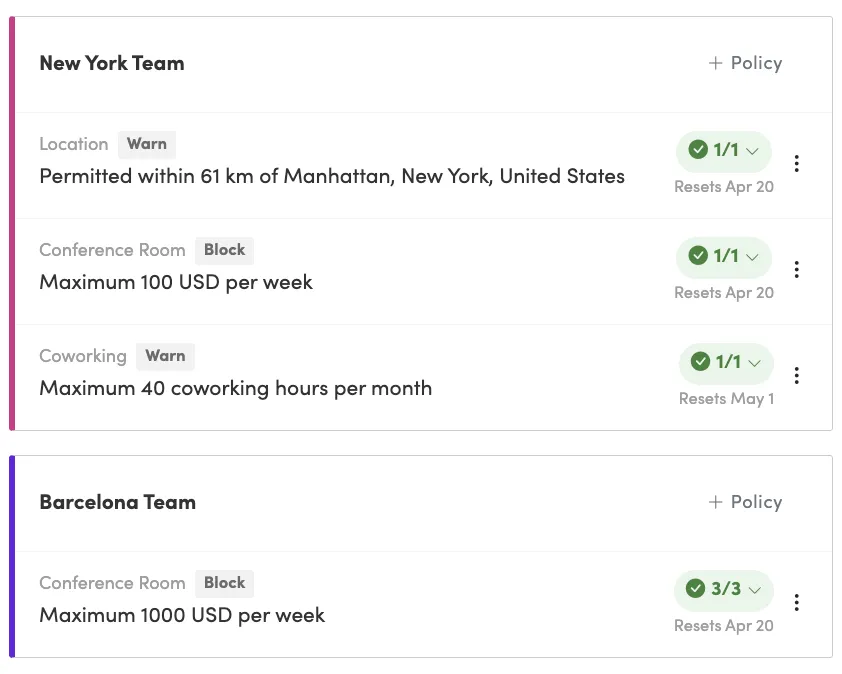
Once people are coordinating and spending, the next question lands on the People Operations lead's desk: how do you keep it all in bounds without turning into the office's full-time chaperone? Saying yes to everything blows the budget; saying no to everything kills the program. The answer is guardrails that do the watching for you. Team policies let you set the rules once (spend limits, region restrictions, how strictly each is enforced), and then step back while Croissant holds the line.
Key Capabilities
- Spend controls: Set daily, weekly, or monthly caps and layer multiple policies together
- Region restrictions: Blacklist areas around your HQ to keep the program focused on distributed work
- Three enforcement modes: Warn, Approval, or Block depending on your governance requirements
- Compliance reporting: Track which members are within policy and get detailed audit trails
Read the full guide on team policies →
Team Insights
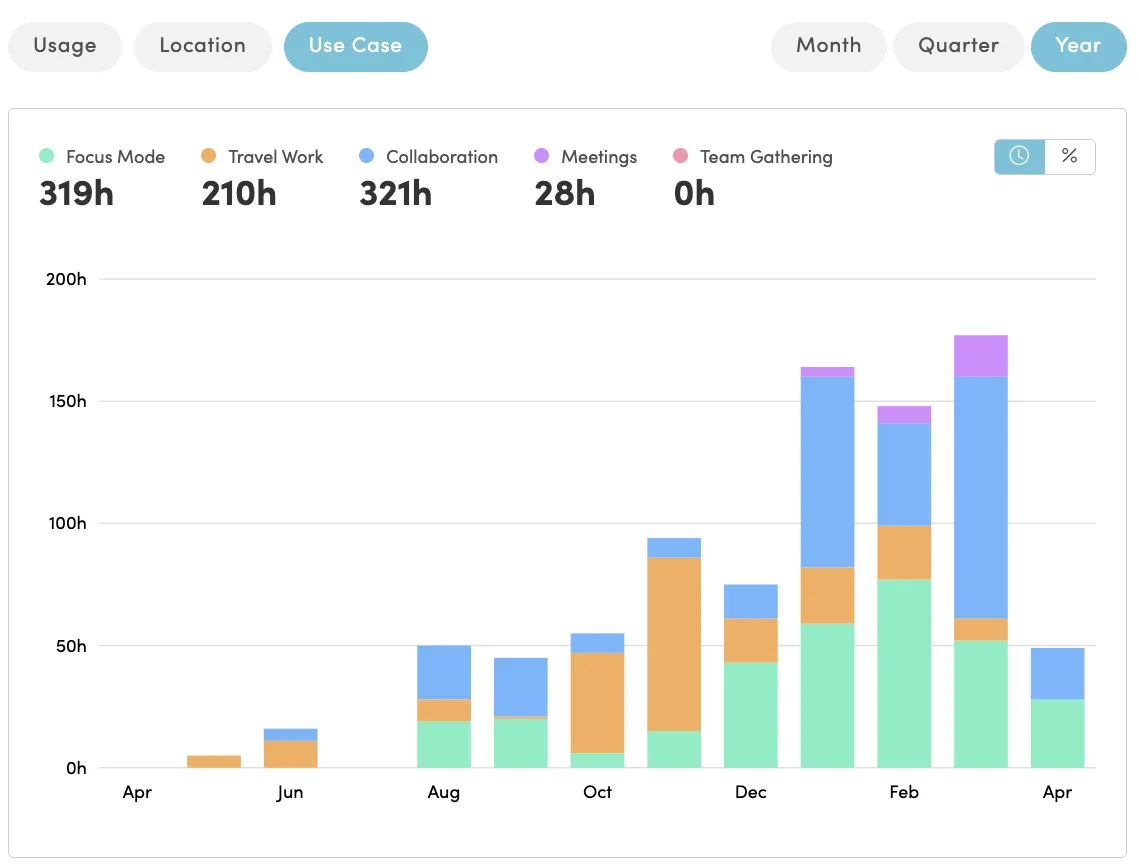
Guardrails keep the program in bounds, but they can't tell you if it's actually working, and sooner or later, someone in finance will ask. "Is this worth it?" is a fair question, and until now the honest answer was a shrug and a gut feeling. Team Insights replaces the shrug with the numbers: the data you need to prove ROI, defend the budget when renewal season comes, and decide where the program should go next.
Three Dimensions of Visibility
- Usage trends: Track coworking hours and conference room bookings over time to spot adoption patterns
- Location insights: Understand where your team works, identify high-value spaces, and inform regional decisions
- Use case breakdown: See whether your program supports focus, collaboration, meetings, travel, or team gatherings
Read the full guide on team insights →
Take control of your workspace program
Set policies, track usage, and give your team the flexibility to work from anywhere, all from one dashboard.
AI-Powered Booking
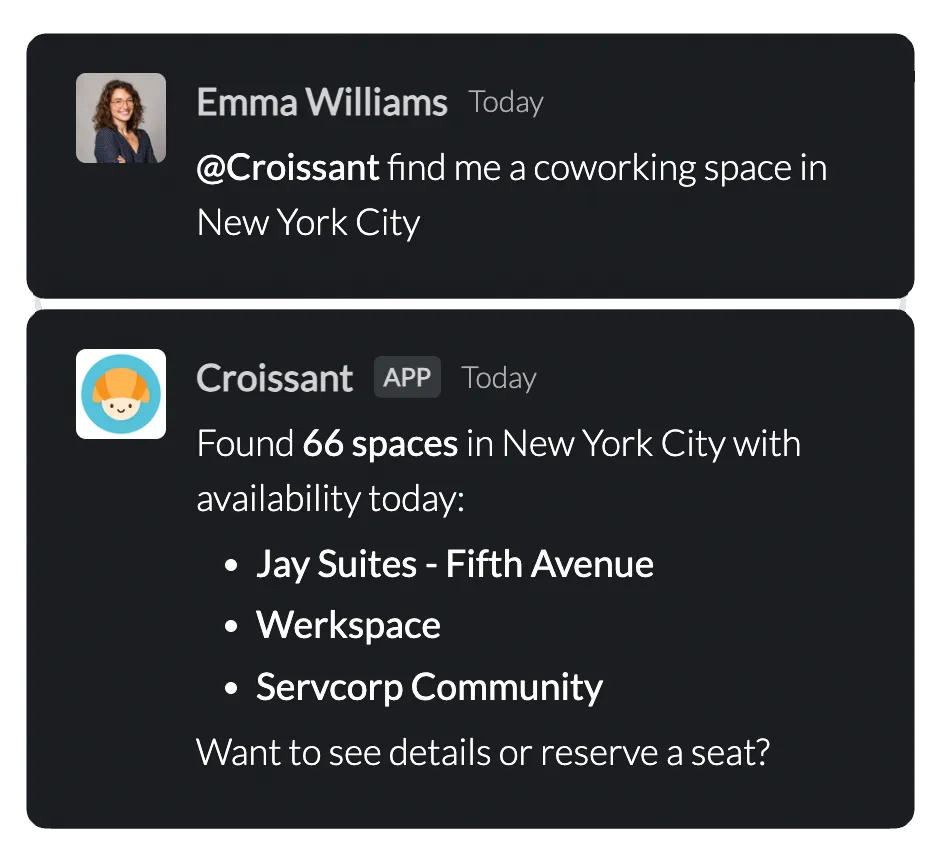
Here's the catch with everything so far: it only works if people actually use it, and people won't open yet another app to do it. The trick isn't to pull your team into Croissant. It's to bring Croissant to wherever they already are. So this quarter we did exactly that, with two integrations that let booking happen inside the tools your team lives in all day.
MCP Server
Croissant's Model Context Protocol (MCP) server lets AI assistants interact directly with workspace data. Search for spaces, check availability, book conference rooms, and manage reservations, all through natural language via tools like Claude. No app switching required.
Slack Integration
Croissant for Slack brings workspace management into your team's communication hub. Find nearby spaces, book conference rooms, check in, and manage your bookings without ever leaving Slack. It's included with every Croissant plan at no extra cost.
Learn more about Croissant for Slack →
Connected Workspaces
And then there's the moment all of this has been building toward: someone actually shows up at the door. A booking only matters if it gets you inside, and on the other side of that door is an operator who needs the room to show as taken the instant it's reserved. That's the quiet fifth job, stitching the software to the physical world, and this quarter we shipped four integrations to close the gap, connecting Croissant straight to the access control and booking systems spaces already run on.

Access Control
- KISI: Members with active bookings unlock doors directly from the Croissant app, eliminating key cards and fobs
- Salto KS: Electronic lock integration with time-limited access credentials that activate automatically at check-in
Booking Systems
- OfficeRnD: Conference room availability syncs in real time between OfficeRnD and Croissant, with full booking details in both systems
- Google Calendar: Bookings appear as calendar events, availability is read directly from Google Calendar, and one account covers all your rooms
What's Coming Next
Get people together, set the guardrails, measure what's working, make it effortless, and connect it to the real world. That's the shape of the program we set out to build this quarter, and the spreadsheet is finally retired. But a program is never really finished, and the same People Ops leaders who pushed us this far are already pointing at what's next:
- Vendor consolidation, manage all your workspace providers in one place
- Spend management, deeper visibility and control over workspace budgets
- Multi-role access, granular permissions for admins, managers, and team leads
- Fractional offices, dedicated space on the days your team needs it
Stay tuned for more updates, and as always, we'd love to hear your feedback on these new features.
Build a Smarter Hybrid Workplace
Team collaboration, workspace policies, usage insights, AI-powered booking, and seamless access control, all in one platform. See how Croissant can power your team's hybrid work program.
- ✓ See where teammates are working and coordinate team days effortlessly
- ✓ Set policies, track insights, and stay in control of your workspace program
- ✓ Book from Slack, AI assistants, or the Croissant app, with connected access control